
Negotiating Cost Price Increases (CPIs) with your Amazon Retail Vendor Manager is often a complex task due to the tug-of-war between both parties. This negotiation process is essential for improving your margins as a vendor. You might think Amazon will simply pass the increased cost on to the end customer, as is common in the Marketplace , but the reality is different. Amazon tracks the lowest market prices with its repricer ( as we explained in the article on CRaP ), making it difficult to maintain margins when costs rise.
Remember that Amazon Retail reserves the right to match or beat the lowest price it finds on the market, so it's very important that you have those costs very well negotiated.
In this article I explain the steps to increase the possibilities of approved your cost price increases. Eye, it is not infallible, much less. But you will have more numbers to succeed, yes.
Step 1: groups cost price increases
Price negotiations with any retailer can be long and complicated, and Amazon is no exception.
Amazon Supplier Managers use sophisticated tactics to delay or reject price change requests. Therefore, it's best to submit a single request for as many products as possible.
Additionally, link these CPIs to your negotiations/emails during Joint Business Planning (JBP), as Amazon likely won't accept cost changes outside of these annual periods. That's what usually happens. Don't get frustrated. It's nothing personal, and that's how it works most of the time.
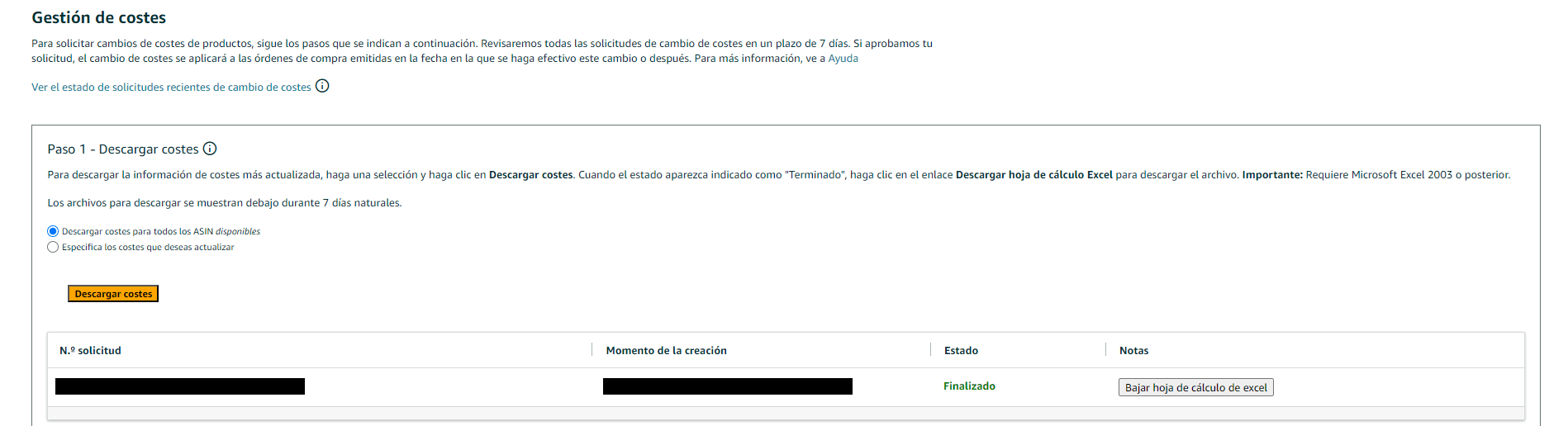
Step 2: Upload the new cost prices to Central Vendor
The next step is to upload your new cost prices for all items to Vendor Central. It shouldn't be surprising if your request is rejected within a few hours or days. This is because, as I mentioned earlier, Amazon's system tends to automatically reject many cost increases.
However, your Vendor Manager can override the system and manually approve cost changes. So, take this step to avoid delays in negotiations.
Step 3: Inform your Venger Manager
Now it's time to inform your Manager about the cost changes. Send an email detailing the specific changes for each item , including the average CPI increase (in percentage), the reason for the cost change, and the effective date of the change. This doesn't guarantee approval, no matter how well you justify the increase. For example, the price of your main raw material might have increased by 30%, resulting in a 30% cost increase, but Amazon won't automatically approve it.
You should keep in mind that the cost change must be due to a sustained increase in your own cost structure, not a temporary fluctuation. The reasons Amazon accepts are increases in shipping costs, increases in raw material prices, and variations in exchange rates.
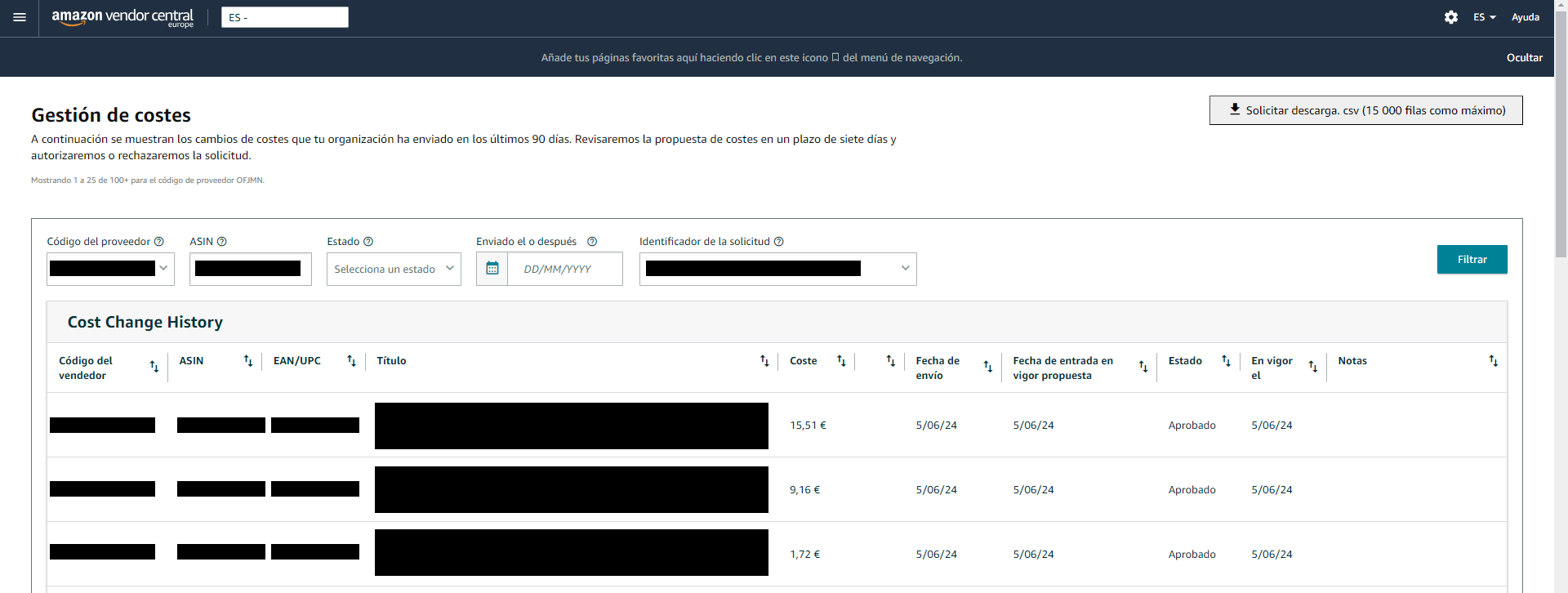
Step 4: Negotiate margins and dates
The Vendor Manager will likely try to reject the cost increase, as they are concerned about the potential decrease in their account margin. Therefore, a data-driven approach to support your CPI request will be crucial.
Demonstrate that your account margin will not be significantly affected by the cost change. You can do this by showing MSRP/RRP increases aligned with the CPI, indicating that the increases are permanent (not temporary), and showing that other retailers have already accepted the increase.
Having price tracking software is essential for showing how prices have changed on Amazon. With Fredda, from Azzgency, you can get that information.
Step 5: Take advantage of your alternatives
If Amazon doesn't accept your price changes (which is likely), immediately stop shipping the affected items until they are accepted. Depending on your negotiating power, this could get your Vendor Manager to reconsider their decision.
If you don't get a positive response after two weeks, consider the FBA/3P strategy: create a 3P account and sell directly to Amazon customers. While this will require you and your team to learn new skills, it will make you less dependent on Amazon's CPI approval in the future.
Conclusions
While increasing your cost prices on Amazon isn't easy, following the steps in this guide will give you a better chance of getting approval from your Vendor Manager. It's always good to have a backup plan in the form of other acquisition channels. One could be an Amazon Seller account, but it could also be selling on other marketplaces like Miravia, TikTok Shop, Shein, or your own online store.
The process of requesting a price increase from a vendor is one of the most complicated and lengthy you'll have to deal with. Don't despair, as it will take time to get a positive response. Azzgency can help you prepare for these negotiations before the price increase. Don't hesitate to contact them.